> For the complete documentation index, see [llms.txt](https://docs.shoplift.ai/llms.txt). Markdown versions of documentation pages are available by appending `.md` to page URLs; this page is available as [Markdown](https://docs.shoplift.ai/test/template-testing/previewing-a-template-test.md).
# Previewing a Template Test
You can preview any test directly in your browser with Shoplift's **Preview Mode**. Preview Mode can be used on draft, active, and ended tests.
### Using Preview Mode
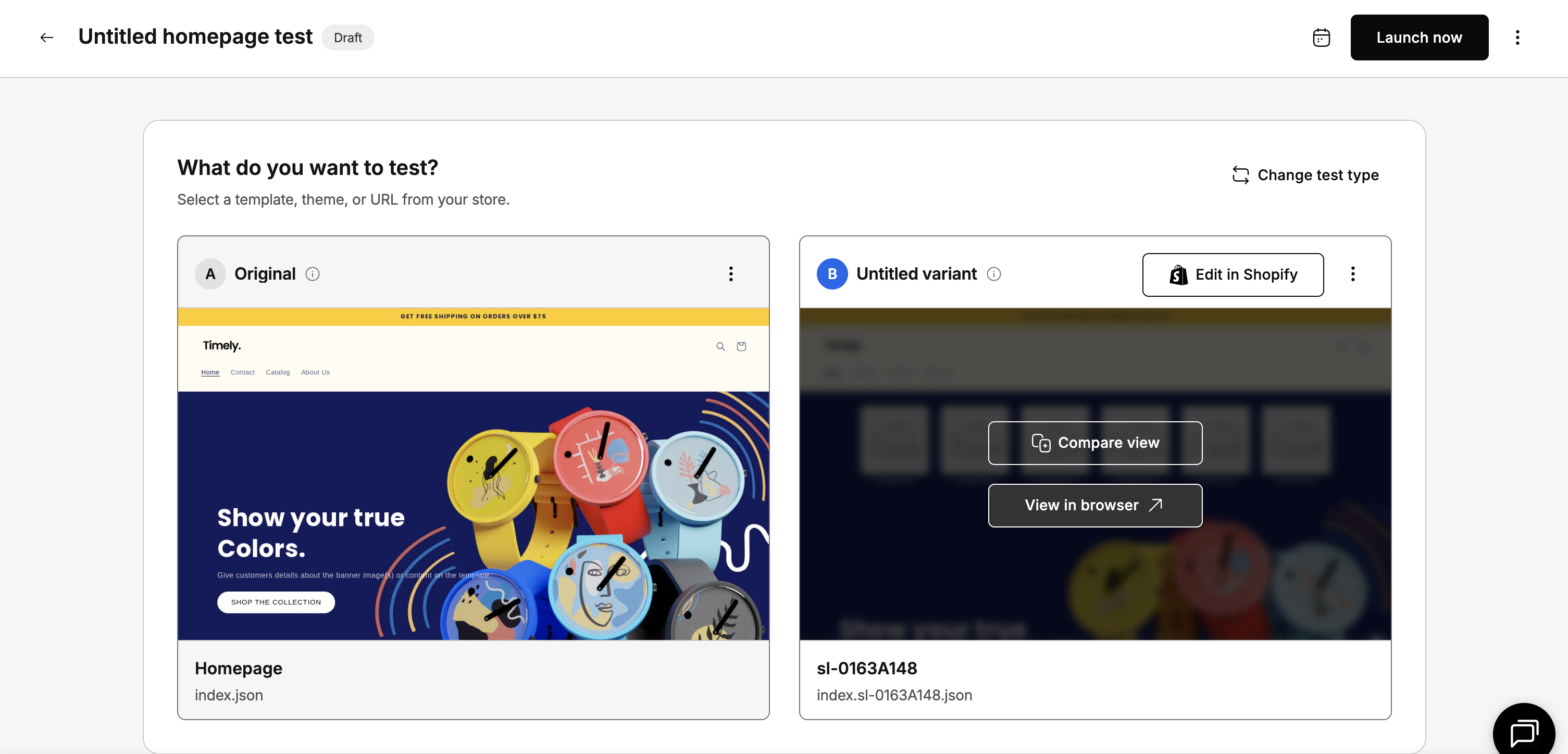
On a given test draft or report, hover over your variant preview and select **View in Browser**. This opens Preview Mode in a new tab.
When using preview mode, you can experience your test as a website visitor would.
### Switching Between Variants
At the bottom of the preview window, you’ll see a toolbar that lets you switch between:
* **Original (A**) – your current experience
* **Variant (B)** – your test experience
You can navigate across your site while the preview is active to see how each page looks when assigned to the A or B variant.
{% hint style="info" %}
**FAQ: Why do my edits show up on my original and variant previews?**
If making edits to a template test in Shopify affected your original template, you likely made theme-level edits to your variant template. You should revert these edits and set up a new test by clicking "Test a theme or global element."
{% endhint %}
### Exiting Preview Mode
To return to your live site, simply select Exit in the toolbar.
### Tips for a successful template test
* **Test one change at a time** when possible. If you change the hero image, button color, and page layout all at once, you won't know which change made the difference. Start with the change you think will have the biggest impact.
* **Let your test run long enough.** Wait until Shoplift shows statistical significance before making decisions. Ending a test early based on incomplete data can lead you to the wrong conclusion. Most tests need at least 14 days and several hundred visitors per variant.
* **Don't edit your original or variant mid-test.** Changing either template while the test is running can skew your results. If you need to make changes, pause the test first.
* **Run as many tests as you want.** Shoplift has no limit on how many tests you can run at the same time. You can run template tests, price tests, and other test types concurrently. Behind the scenes, Shoplift automatically manages which tests each visitor sees to keep your results clean and reliable.